The agent has finished the implementation, and the tests pass. What should you look at next in review?
Beyond whether the feature works, there are other questions. Did it add unnecessary branches? Leave unused code behind? Copy an existing implementation? Make a small change depend on parts of the system it shouldn't need?
Answering those questions by rereading every file is expensive. Static analysis can gather clues for each one. But a report saying "complexity: 7" or "duplicate code found" doesn't tell you whether anything needs changing.
Use static analysis metrics to decide what to investigate in review, not just to grade the code. This post covers four areas: how to analyze each one, how to read the results, and how to decide what to do next.
Start with the question you want to answer
| Question | Metric or finding | What to check in review |
|---|---|---|
| Is the logic becoming too complicated? | Per-function complexity | Are the branches necessary? Does the function mix unrelated responsibilities? |
| Is there code we no longer need? | Unreachable code, unused files and definitions | Can it be deleted? Are there callers the analyzer cannot see? |
| Are we implementing the same thing again? | Clone groups and duplication rate | Would a behavior change or bug fix need to happen in several places? |
| Are we widening the impact of changes? | Coupling, dependencies, dependents, and cycles | Do the dependencies fit the code's role? How much surrounding code needs checking? |
The examples use polyscan and its Python counterpart, pyscn, both of which we develop. Run a full analysis from the repository root to get the results together:
npx polyscan analyze .   # JavaScript / TypeScript, Go, Rust, C++
uvx pyscn analyze .      # Python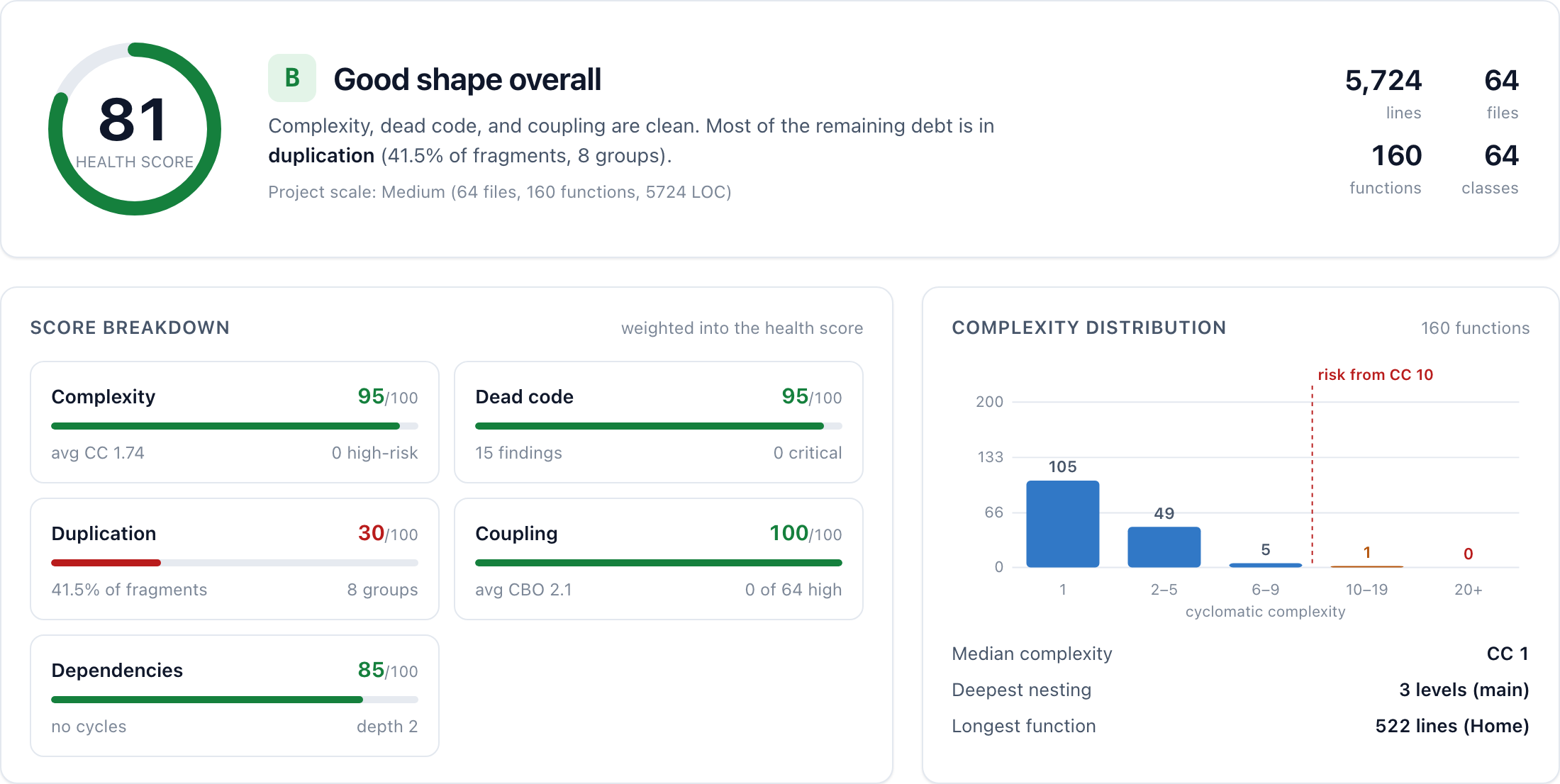
Available analyses vary by language. The focused commands below use polyscan for JavaScript / TypeScript. For Python, the full pyscn report above includes the corresponding sections.
Whichever analysis you run, analyze the whole repository. Looking only at changed files leaves out callers and original implementations.
1. Complexity: which function's branches need a closer look?
Complexity analysis helps find functions where branching makes behavior harder to follow and test cases harder to work out.
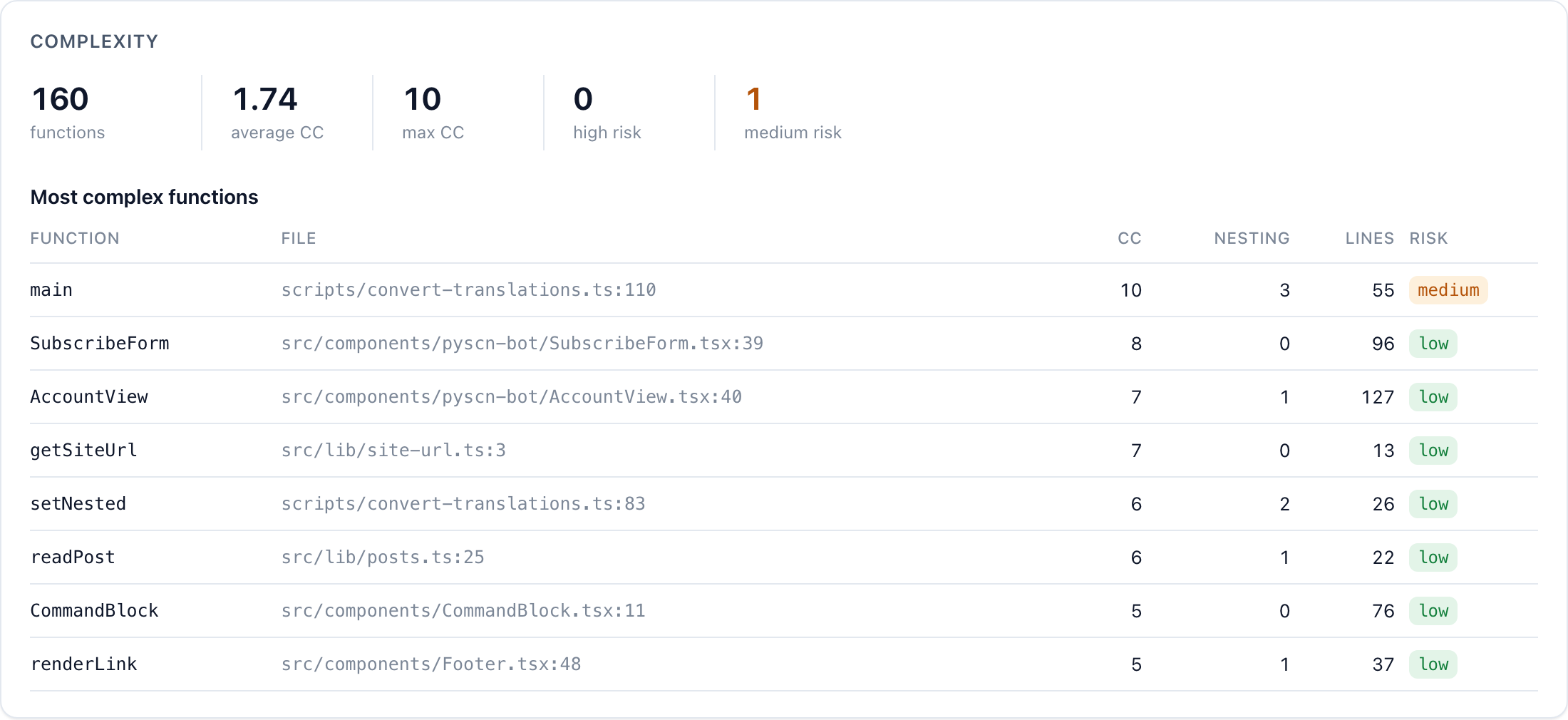
npx polyscan analyze --select complexity .The metric here is cyclomatic complexity, which counts decisions in the control flow. It leaves out other aspects of readability, such as nesting depth or how well variables are named. Start with individual functions, especially ones touched by the change or whose scores have increased. A repository-wide average can hide complexity concentrated in a few functions.
For example, the function that returns this site's URL had a complexity score of 7 in 13 lines:
export function getSiteUrl() {
  return (
    process.env.SITE_URL ??
    process.env.NEXT_PUBLIC_SITE_URL ??
    (process.env.VERCEL_PROJECT_PRODUCTION_URL
      ? `https://${process.env.VERCEL_PROJECT_PRODUCTION_URL}`
      : undefined) ??
    (process.env.VERCEL_URL
      ? `https://${process.env.VERCEL_URL}`
      : undefined) ??
    DEFAULT_SITE_URL
  ).replace(/\/$/, "");
}
That score alone doesn't make the function too complex. It does draw attention to the fact that returning one URL involves trying four environment variables and a default in sequence.
The review questions are concrete: Which value should production use? Is this priority order correct when several are set? Should missing configuration silently fall back to a default? If every branch is required, keeping them and testing their behavior is appropriate. If one supports an environment we no longer use, it can go.
Splitting the function into smaller pieces could lower each score. But scattering the same decisions across several functions doesn't necessarily make them easier to understand. Before trying to lower the number, find out what decisions it represents.
2. Dead code: what still needs to be here?
After reviewing the branches, check whether some code never executes or some files are no longer used at all.
npx polyscan analyze --select deadcode .It helps to distinguish two kinds of findings. Unreachable code, such as a statement after an unconditional return, is found by following control flow within a function. Unused definitions and files are found by examining references, including calls and imports.
Unused-file detection depends on the callers being in scope. Leave them out, and used code looks unused. Analyze the whole repository here too.
On this site, the analysis reported fifteen unused candidates, and seven of them were genuinely unused files, totaling 463 lines. Six were icons that became unnecessary when an agent redesigned the landing page. It removed the imports but left the files. The seventh was an image copied from our old site that had never been used.
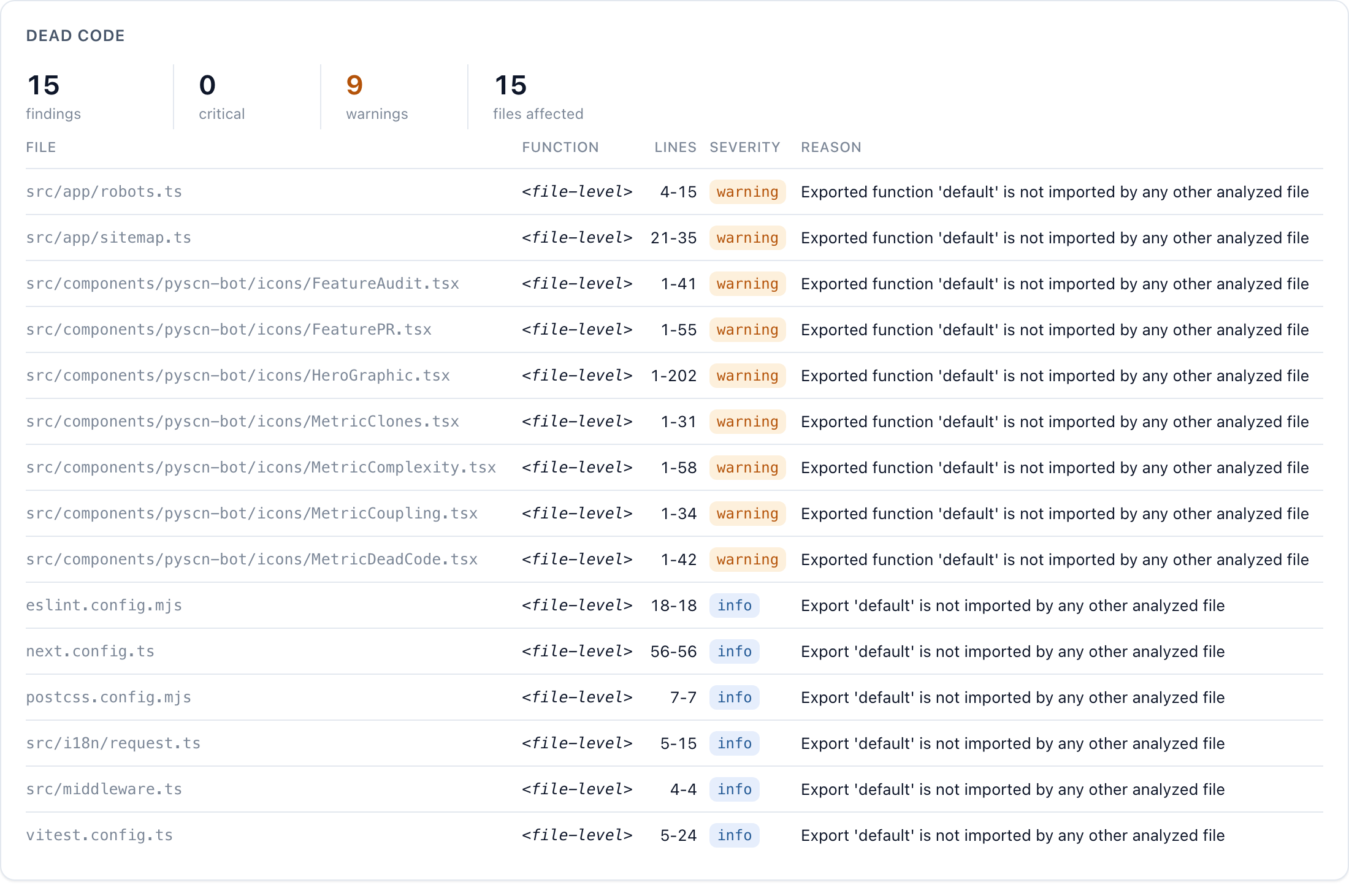
The page still rendered correctly with the files left behind. The diff showed the deleted imports, not the leftover files. Thirty-two pull requests were merged after the redesign while those files remained unnoticed. Inspecting references across the repository finally exposed them.
The other eight candidates were files such as robots.ts that Next.js loads by naming convention, and configuration files read by tools such as ESLint and Vitest. "No reference found" isn't the same as "safe to delete." Check public APIs, framework conventions, and dynamic loading before removing a candidate.
Not everything obsolete shows up in this category, either. We noticed a one-off translation conversion script because of a complexity finding. The migration it performed was already finished, but that couldn't be inferred from control flow or references alone. We deleted the seven files and that script in the same pull request as this post.
3. Duplication: will the same fix need to happen twice?
Even if all the code is needed, copying the same behavior into several places adds maintenance work. Clone detection helps find those copies.
npx polyscan analyze --select clone .polyscan compares function structure and reports groups of identical or similar code. Unlike a text search, it can find candidates whose variables have been renamed or whose statements have been partly changed. Our post on duplicate-code detection explains the mechanism in detail.
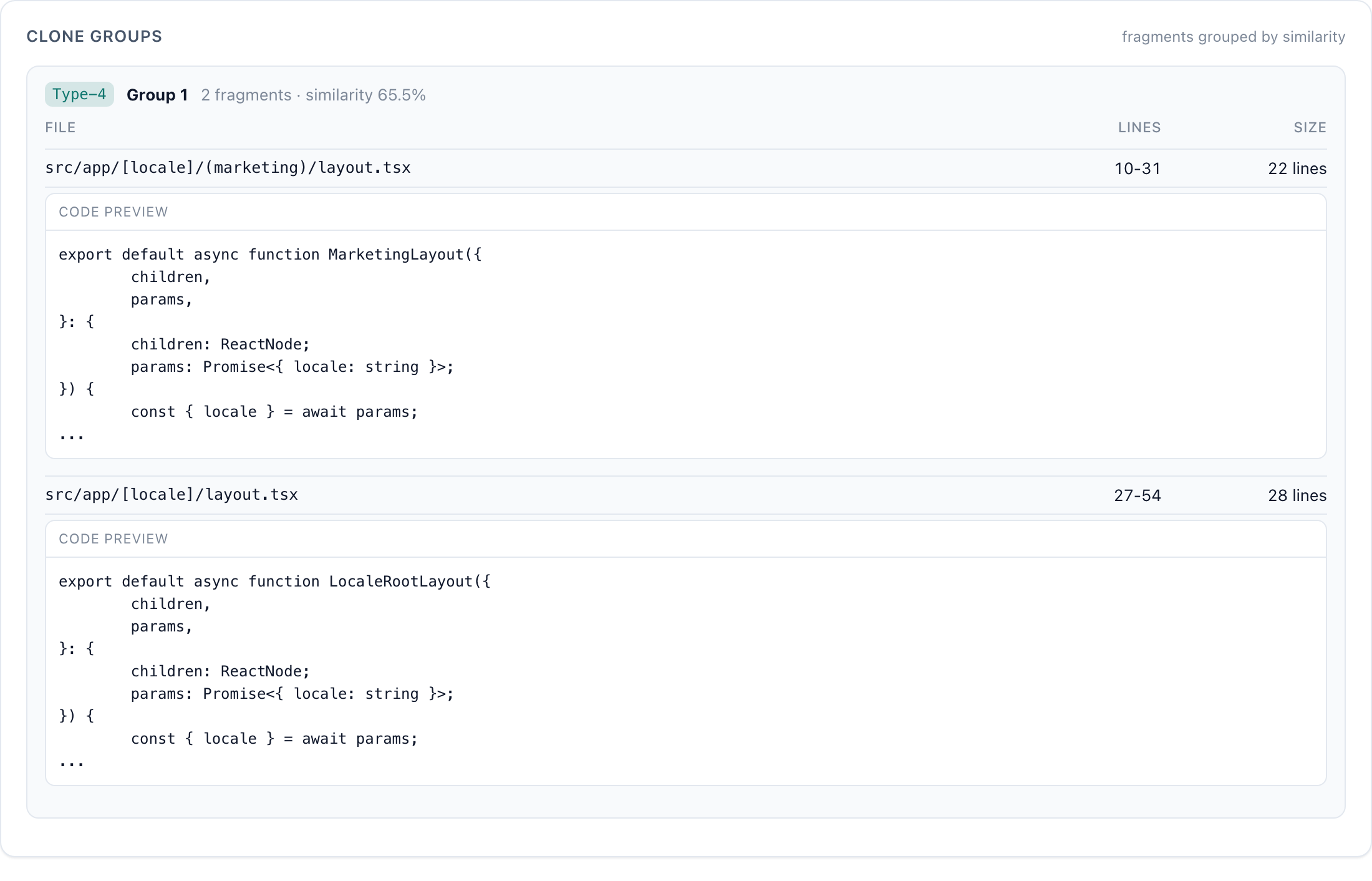
Start with clone groups introduced by the change, rather than the repository-wide duplication percentage. The original implementation is usually outside the changed files, so the whole repository is in scope here too.
As an illustrative example, consider two functions, one fetching orders and the other fetching customers. Both call an API, apply the same retry logic, and convert the result into their respective types. If a bug in the retry logic would need fixing in both functions, sharing that part could help.
But similar structure doesn't mean the entire functions should be merged. If orders and customers have different requirements that will evolve independently, combining them may just introduce more conditional logic. The useful question isn't "How many lines can we remove?" It's "Would these pieces change together for the same reason?"
Generated code and test data can contain intentional repetition. Rather than aiming for zero duplication, start with copies where a future fix could easily miss one occurrence.
4. Dependencies and coupling: how far should the review reach?
Individual functions can be simple and free of duplication while still depending on many other parts of the system. Reading the function alone is then not enough to assess the impact of a change. Dependency analysis shows those connections.
npx polyscan analyze --select deps .  # Module dependencies
npx polyscan analyze --select cbo .   # Class/type coupling
Dependency analysis builds a graph of which modules import which. If it reports a cycle such as A → B → C → A, open the files and find the import that closes the loop. A cycle doesn't necessarily cause a runtime error, but it gives you a reason to inspect initialization order and the division of responsibilities.
CBO (Coupling Between Objects) counts the other types a class or type refers to. Exactly which references count depends on the language and analyzer. A large value is a clue that understanding the type may require understanding many collaborators.
In a previous analysis, polyscan's JavaScript clone detector had a coupling score of 22, and its Go/Rust/C++ detector scored 18. Comparing their dependencies showed that both assembled nearly the same components: tree comparison, fingerprinting, grouping, and so on. The numbers alone didn't reveal that design overlap. Reading the dependency lists did.
High coupling may be appropriate for a class whose job is to coordinate many components. The same score in a small conversion helper would be more surprising. Ask whether each dependency fits the code's role.
To assess change impact, look at dependents as well as dependencies. A change to a widely used type means checking its callers and tests more broadly.
Good metrics don't establish correct behavior
These four areas help decide where to read more closely. A lack of findings doesn't guarantee that the code meets its requirements.
The Python tool add-skills contained this error handler:
try:
    with open(skill_file, encoding="utf-8") as f:
        post = frontmatter.load(f)
except (OSError, yaml.YAMLError):
    return None
If loading the frontmatter fails, the function returns None, which the caller interprets as "no skill." Deleting a closing quote from the YAML frontmatter in SKILL.md produced "No skills found" rather than an explanation of the malformed metadata.
pyscn rated the function low risk with a complexity score of 3. Ruff didn't flag this behavior even with every rule enabled. The implementation was simple, but the user had no way to tell what needed fixing.
Checking this requires an explicit expectation: malformed frontmatter should produce a message naming the file and the cause. Then verify that behavior directly or through a test. Lowering complexity, duplication, or coupling wouldn't establish it.
Make it part of the agent's workflow
Keep a baseline before a change, then run the analysis again afterward and compare. That makes it easier to focus the review. When comparing, keep the tool version, configuration, and scope the same. Changing whether generated code or external libraries are included can move the numbers without any change to your own implementation. Instead of fixing every longstanding finding in the first report, start with newly added branches, unused files, copies, and dependencies.
Give the agent a more concrete task than "improve code quality":
Analyze the whole repository before and after the change. Review increases in complexity, newly unused code, new duplicates, and dependency changes. For each finding, show the relevant code and explain whether it should be changed or kept. Check error behavior separately against the requirements.
Both polyscan and pyscn can be called directly by coding agents. Periodic whole-repository analysis also helps catch problems left by earlier changes. The Polyscan GitHub App runs weekly by default; an AI agent reads code associated with important findings and summarizes what to fix in a GitHub Issue. It's free for public repositories.
What a review needs is a judgment such as "this branch is obsolete" or "these copies need to be fixed together," rather than just "the score improved." Static analysis helps you find the code you need to make that judgment.
Sources and further reading:
- Measurements for this post: this site (polyscan-app) at
24ea613with polyscan 0.6.0; add-skills at26dd058with pyscn 1.32.5 and Ruff 0.17.1. Default settings throughout, except--select ALLfor Ruff. - Clone-detector coupling scores are from the dependency analysis post, measured on polyscan 0.5.0 source with version 0.5.1.
- Commands and language support: polyscan CLI and pyscn.